
Why generic calendars fail venues
Google Calendar and Outlook are excellent at what they were built for: a person’s schedule. A venue does not have a schedule. A venue has inventory, and inventory behaves differently.
A meeting can be double booked and the worst outcome is an apology. A ballroom cannot. When two weddings are sold the same Saturday, one of them is being cancelled, and the venue is absorbing the cost, the refund and the review. The stakes are asymmetric, so the tool has to be.
The specific gaps are consistent across every venue that has tried to run on a generic calendar. There is no room-level availability, so a booking in the garden looks identical to a booking in the ballroom. There is no distinction between a confirmed event and a maybe. There is no turnaround time, so a calendar that says 11pm to 9am is free is lying to you about a room that needs six hours of reset. And critically, nothing stops you from creating an overlap: the calendar will happily let you stack three weddings on one date without a word.
How conflict detection actually works
Smart Path treats every booking as a claim on a specific space for a specific window of time, including the setup and teardown you configure. When you save a new event it compares that claim against every other claim on the same space.
The check runs before the booking is created, not after. That ordering matters more than it sounds. A system that reports conflicts on a daily digest has told you about a problem your client already knows about. A system that checks at the moment of entry has prevented the problem entirely.
Holds are included in the check. A tentatively held date produces a warning rather than a hard block, because sometimes you genuinely do want to take a firm booking over a soft hold. The system surfaces the decision instead of making it for you.
- Overlapping time windows on the same space are flagged immediately.
- Configured setup and teardown time counts as occupied.
- Tentative holds produce a warning; confirmed events produce a block.
- Changing an existing event re-runs the check against its new times.
Setup and teardown: the time nobody books
Ask a venue what time a Saturday wedding ends and you will hear eleven. Ask what time the room is available again and the honest answer is often the following afternoon. Somewhere between those two answers, venues lose money and make promises they cannot keep.
The gap exists because the booked hours and the occupied hours are different numbers, and most calendars only record the first one. A ballroom with a 6pm ceremony has been occupied since the florist arrived at 10am. That morning does not appear anywhere in a calendar entry that says 6pm to 11pm.
Smart Path lets you attach a setup window and a teardown window to each event or each space. Those hours are treated as genuinely occupied for conflict checking. The result is a calendar that tells you the truth about what you can sell, which is the only calendar worth having.
If your calendar shows a room as available at 8am on the morning after a 400-guest wedding, your calendar is not describing your venue.
Reading the calendar at a glance
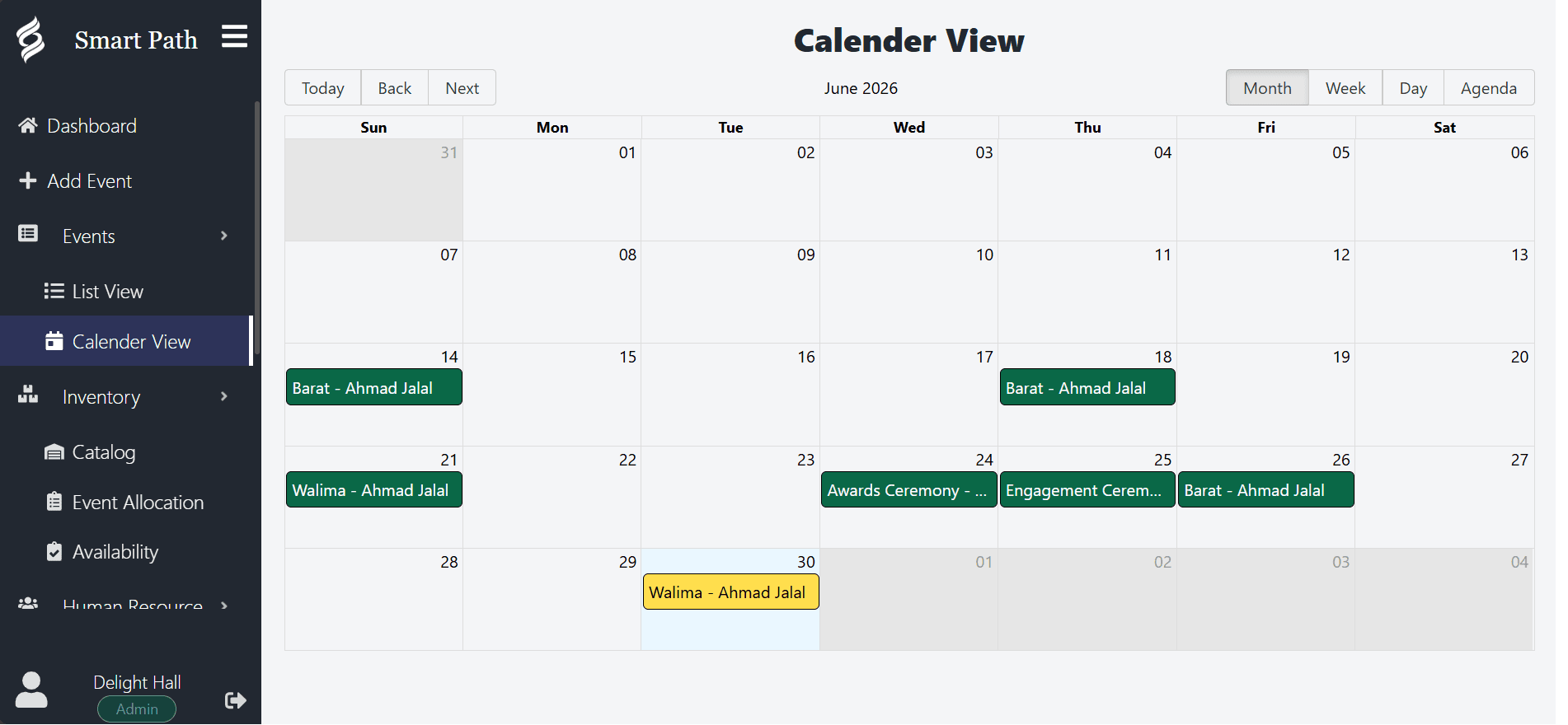
A booking calendar is used in seconds, not minutes. Someone is on the phone, and the question is whether the second Saturday in June is free. Every design decision in the Smart Path calendar serves that moment.
- Confirmed events, tentative holds and blocked dates are visually distinct at a glance.
- Each entry shows the space so multi-room venues can read one screen instead of four.
- Month, week and day views answer different questions: what is open, what is this week, and what is happening today.
- The day view is the one your operations team lives in, with timings and setup requirements in order.
Multi-space venues and the combination problem
Venues with several rentable spaces face a problem single-room venues never see. Spaces are not independent. A ballroom that divides into two halves cannot be sold as a whole and as two halves on the same evening. A garden ceremony site may be unusable while the adjoining terrace hosts a cocktail hour.
These relationships are obvious to your team and invisible to software that treats each room as a separate calendar. Smart Path lets you record events against the specific spaces they occupy so that availability reflects how your venue actually works rather than how a generic scheduling tool assumes it works.
For most independent venues this is the difference between software that reduces phone calls and software that adds one more place to check.