Skip to content
Smart Path

Feature

Branded event signage generated from the booking, not from scratch

Every event at your venue needs a sign at the entrance telling guests they are in the right place. Smart Path generates it from the booking details you already recorded, so producing signage stops being a design task and becomes a print button.

The short answer

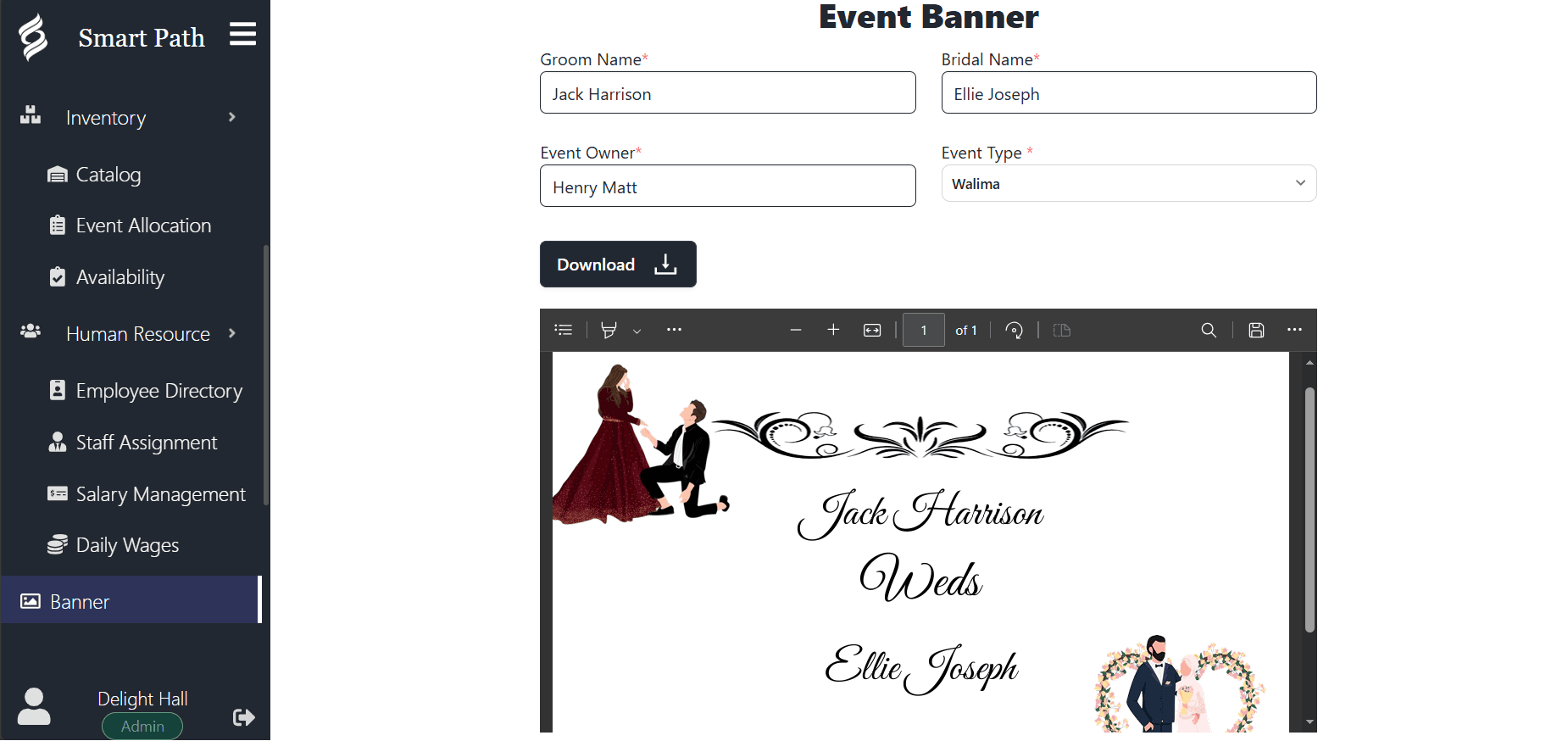
Event signage generation creates the welcome boards and entrance displays for each event directly from the booking record. Because the client name, event type, date and space come from the booking rather than being retyped into a design file, the signage is always correct and takes seconds instead of half an hour.

  • Signage generated from booking data, so names and dates are never retyped.
  • Consistent branding across every event without a designer.
  • Produced in seconds, including for a late booking added this week.
  • Suitable for print or for a screen at the entrance.
Smart Path event banner designer with name and event-type fields and a live preview of the generated banner
Capabilities

Built for how venues actually work

  • Generated from the booking

    Client name, event type, date and space are pulled from the record rather than typed again.

  • Consistent branding

    Every event gets signage that looks like it came from the same venue, because it did.

  • Seconds, not sessions

    A last-minute booking gets the same quality of signage as one planned a year out.

  • Print or screen

    Use the output for a printed board at the door or a display at the entrance.

  • Multi-event days

    Running three events across three spaces means three correct signs, not one generic one.

  • Guests find the right room

    Clear signage is the cheapest way to stop guests wandering into the wrong event.

Why signage is a systems problem, not a design problem

Venue signage looks like a design task and behaves like a data task. The design is settled once: your layout, your colours, your logo. What changes for every event is a handful of fields, and those fields already exist in the booking.

Treating it as a design task is what creates the familiar Friday afternoon scramble. Someone opens last week’s file, changes the names, and saves it under a new name. The template drifts, the spacing breaks, and periodically a sign goes out with the previous client’s name still on it, which is a memorably bad way to greet a wedding party.

Generating signage from the booking removes the entire failure mode. The name on the board is the name on the booking. It cannot be last week’s client, because last week’s client is a different record.

What venues actually put on signage

Entrance signage does a small number of jobs, and doing them clearly matters more than doing anything clever.

  • Confirming guests are at the right venue and the right event.
  • Directing guests to the correct space when several events run at once.
  • Naming the occasion, which for private events is the main content of the sign.
  • Carrying the venue’s branding, because photographs of the entrance will be shared.
  • Occasionally, showing a schedule for multi-session or corporate events.

Multi-event days and the wrong-room problem

A venue running a single event a day can get away with a chalkboard. A venue running three events across three spaces cannot, and the cost of getting it wrong is disproportionate.

Guests who walk into the wrong event are not just embarrassed. They interrupt someone else’s ceremony, they arrive at their own late, and your staff spend the first hour of service doing traffic direction instead of their jobs.

Generating signage per event, from bookings that already record which space each event occupies, makes correct wayfinding the default. Three bookings produce three signs naming three spaces, and nobody has to remember to make the third one.

On a three-event Saturday, signage is not decoration. It is the cheapest operational staff you will ever hire.

Most venues still print. A board at the entrance is reliable, needs no power and survives a venue with patchy wifi. Generated signage is produced at a resolution suitable for printing at the sizes venues typically use.

Venues with a screen at the entrance get an additional benefit, because a screen can be updated for a late change without reprinting anything. If a client name is corrected on Thursday, the display shows the correction.

Either way the underlying principle is the same: the sign is an output of the booking, not a separate document that has to be kept in sync with it.

FAQ

Frequently asked questions

What is event signage software?

It generates the welcome boards and entrance displays for each event directly from the booking record, filling in the client name, event type, date and space automatically. It replaces the practice of editing a copy of last week’s design file for every new event.

Can we use our own branding?

Yes. The signage design carries your venue’s branding so that every event produces output that looks like it came from your venue, without anyone having to rebuild the layout each time.

Can signage be printed?

Yes. The generated output is suitable for printing at the board sizes venues typically use at entrances, and it can equally be shown on a screen if you have a display at the door.

What if an event detail changes after the sign is made?

Because the signage is generated from the booking rather than maintained as a separate file, regenerating it after a change takes seconds. That is the main practical advantage over keeping design files: there is nothing to keep in sync.

Ready to run your venue on one system?

Book a 20-minute walkthrough and see Smart Path handle your real bookings. Free for your first month — no credit card required.

Book a Demo